Frequently Asked Questions
Product Information: Alkira Remote Access Client
What is the Alkira Remote Access Client and what is its main purpose?
The Alkira Remote Access Client is a component of Alkira's Network-as-a-Service (NaaS) solution designed to provide secure, reliable remote access to corporate resources. It eliminates the need for hardware or VPN concentrators, supports both Windows and Mac users, and scales on demand. Organizations use it to connect remote users securely to corporate resources across various cloud providers without compromising security. Learn more.
How does the Alkira Remote Access Client work?
The Alkira Remote Access Client allows users to connect to the nearest Alkira Cloud Exchange Point (CXP) from anywhere in the world. It enforces firewall security policies, supports user authentication, and provides segmentation and microsegmentation for user groups. The client is available for both Windows and Mac, and users can access any corporate resources subject to security policies. See product details.
How can I configure the Alkira Remote Access Client?
Configuration is straightforward via the Alkira Dashboard. Required parameters include authentication mode, client IP subnet, and Alkira CXP region. Once configured, users can download the client for Windows or Mac and connect to corporate resources. For step-by-step instructions, visit the configuration guide.
Features & Capabilities
What are the key features of the Alkira Remote Access Client?
Key features include:
- Geo-Based Connectivity: Automatically connects users to the nearest CXP for optimal performance.
- Zero Trust Security: Enforces firewall policies and user authentication for strong security posture.
- Segmentation & Microsegmentation: Maps user groups to different network segments and security zones.
- Multi-Factor Authorization Support: Supports enterprise AD and SAML-based multi-factor authentication.
- Ease of Configuration: Simple setup with no complex configurations required.
- Access to Any Corporate Resources: Seamless connectivity to resources across cloud providers, subject to security policies.
- Scale & High Availability: Built-in redundancy and high availability; automatic failover to the next closest CXP.
- Audit & Monitoring: Provides visibility into user activities and session history.
Full feature list.
Does the Alkira Remote Access Client require any hardware or VPN concentrators?
No, the Alkira Remote Access Client is delivered as a service and does not require any hardware or VPN concentrator installation in the customer environment. This simplifies deployment and reduces operational overhead. Learn more.
What authentication methods are supported?
The Alkira Remote Access Client supports multiple authentication methods, including enterprise Active Directory (AD) and SAML-based multi-factor authentication. This ensures secure and flexible access control for organizations. See details.
How does Alkira ensure high availability and redundancy for remote users?
The Alkira Remote Access Client is designed with built-in redundancy and high availability. If a user's connection to one CXP fails, the client automatically connects to the next closest CXP without requiring any changes from the user. This ensures continuous access and minimal disruption. Read more.
Can I monitor user activity and session history with the Alkira Remote Access Client?
Yes, organizations can easily monitor user activities and session history using the Alkira Remote Access Client. The Alkira Portal provides visibility into active user sessions, session history, and failed authentication attempts. See audit features.
Security & Compliance
What security features are included with the Alkira Remote Access Client?
The Alkira Remote Access Client includes integrated security features such as Zero Trust Network Access (ZTNA), next-generation firewalls, segmentation, and multi-factor authentication. These features ensure secure connectivity for distributed workforces and applications. Learn more.
Is Alkira compliant with industry security standards?
Yes, Alkira is SOC 2 and PCI-DSS compliant, demonstrating a commitment to securing customer data and maintaining robust operational controls. These certifications ensure that Alkira meets industry standards for security, availability, and confidentiality. See compliance details.
Pricing & Plans
What is the pricing model for the Alkira Remote Access Client?
The Alkira Remote Access Client is offered as a service with a flexible, usage-based pricing model. Organizations pay based on their actual usage, including the number of users and network resources consumed. Commitment-based pricing options are also available for predictable budgeting. For more details, visit the Alkira Pricing Page.
Use Cases & Benefits
Who can benefit from the Alkira Remote Access Client?
The Alkira Remote Access Client is ideal for organizations of all sizes that require secure, scalable remote access for distributed workforces. It is particularly beneficial for enterprises with remote employees, multi-cloud environments, or those seeking to eliminate hardware dependencies and simplify network management. See use cases.
What business impact can organizations expect from using the Alkira Remote Access Client?
Organizations can expect measurable business impact, including reduced deployment times, enhanced security, operational efficiency, and cost savings. Alkira's platform has been shown to reduce cloud setup time by 96% and network management time by 47%, with up to 40% lower total cost of ownership compared to traditional solutions. See business impact.
Customer Success & Testimonials
What feedback have customers given about the Alkira Remote Access Client and platform?
Customers have praised Alkira for its ease of use, rapid deployment, and ability to simplify complex networking tasks. For example, a Network Architect at a large manufacturer stated, "The IT DIY approach was going to take 6 months to be secure and redundant and all. Alkira did it for us in 3 days, and at very low cost." Matt Hoag, CTO at Koch Industries, shared, "We had gone from a mass of complexity and months of work to a dashboard that allowed us simply to draw our network and deploy it in a few hours." See more testimonials.
Can you share specific case studies of organizations using Alkira solutions?
Yes, notable case studies include:
- Michaels: Transformed its network across 1,400 stores, ensuring secure and seamless connectivity. Read the case study.
- Koch Industries: Simplified multicloud networking and improved agility. Watch the video.
- Warner Hotels: Enhanced networking efficiency and visibility. Watch the video.
For more, visit our customers page.
Technical Requirements & Documentation
What technical documentation is available for the Alkira Remote Access Client?
Alkira provides detailed technical documentation, including whitepapers, solution briefs, and a dedicated wiki. For in-depth technical insights, see the On Demand Next-Generation Cloud Firewalls whitepaper, solution briefs, and the Alkira wiki.
Does Alkira offer APIs for integration?
Yes, Alkira provides APIs, including billing APIs that offer real-time cloud network cost data for integration with cost management tools and dashboards. These APIs support automated monitoring and optimization of cloud costs. Learn more.
Support & Implementation
How easy is it to get started with the Alkira Remote Access Client?
Getting started is straightforward. Customers can implement a proof of concept in as little as 4 hours, with full production deployment typically taking about 8 weeks. The drag-and-drop interface and dedicated training platform make onboarding efficient, even for non-technical users. Explore Alkira Training Platform.
What support and training resources are available?
Alkira offers a dedicated training platform with guidance, demos, and resources. 24×7 monitoring ensures SLA commitments, and dedicated support is available via support@alkira.com or support tickets. The Diagnostics Dashboard provides live troubleshooting and visibility into network flows. Learn more.
How does Alkira handle maintenance, upgrades, and troubleshooting?
Alkira provides proactive notifications for maintenance, a Diagnostics Dashboard for troubleshooting, 24×7 monitoring, and dedicated support. These features ensure minimal downtime and operational disruptions. Contact support.
Competition & Comparison
How does Alkira's Remote Access Client compare to traditional VPN solutions?
Unlike traditional VPNs, the Alkira Remote Access Client requires no hardware or VPN concentrators, offers integrated zero trust security, and provides seamless scalability and high availability. It is designed for modern, distributed workforces and multi-cloud environments, reducing complexity and operational overhead. See comparison.
What differentiates Alkira from competitors like Aviatrix, Prosimo, Nefeli, and Cato?
Alkira offers a true abstraction layer leveraging cloud providers' infrastructure, single-click provisioning, integrated security, and a unified platform for both cloud and traditional network use cases. Unlike competitors that focus on overlays, application-centric networking, or require manual configurations, Alkira delivers end-to-end solutions with measurable ROI and vendor-agnostic flexibility. See detailed comparison.



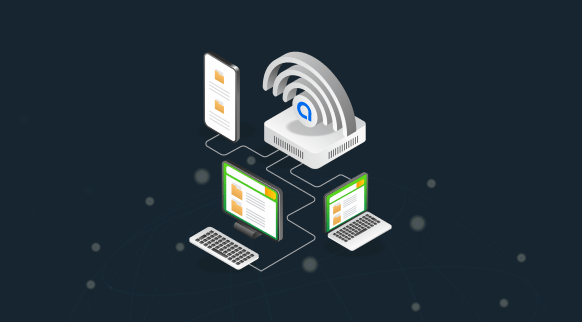
 Figure 1: Remote user connectivity using Alkira CXP
 Figure 2: Alkira Portal showing Active User Sessions for Remote Access
 Figure 3: Alkira Portal showing User Sessions History
 Figure 4: Alkira Portal showing Failed Authentication Attempts
 Figure 5: Alkira Portal showing Configuration for Remote Access Connector