Frequently Asked Questions
Product Overview & Integration
What is Alkira's integration with Cisco Secure Firewall Threat Defense Virtual?
Alkira's integration with Cisco Secure Firewall Threat Defense Virtual (formerly FTDv) enables seamless security service insertion for any network connected to Alkira Cloud Exchange Points (CXPs). This allows customers to avoid the complexity of deploying and maintaining their own Cisco Secure Firewall instances in native cloud environments, providing full visibility and control over traffic between on-premises, cloud, and multi-cloud environments.
How does Alkira simplify the deployment of Cisco Secure Firewall Threat Defense Virtual?
Alkira streamlines the deployment of Cisco Secure Firewall Threat Defense Virtual in just three steps using a single UI configuration page within the Alkira CXP. Customers can configure the service, enable auto-scaling, and define traffic selection policies, eliminating the need for manual setup and reducing operational complexity.
What types of traffic can be secured with Cisco Secure Firewall Threat Defense Virtual in Alkira?
With this integration, customers can secure traffic from on-premises to cloud, between virtual networks in the same cloud provider, and multi-cloud traffic between different cloud providers. The solution also supports inspection of traffic flows from cloud to cloud, cloud to on-premises, and cloud/on-premises to the Internet.
What security features are available with Cisco Secure Firewall Threat Defense Virtual in Alkira?
The integration provides advanced security features such as Next-Generation Intrusion Prevention System (IPS), stateful firewall inspection, URL filtering, application visibility and control, and malware defense. These features help extend enterprise security postures to the cloud and protect against a wide range of threats.
How does Alkira's platform support multi-cloud security and visibility?
Alkira's platform enables customers to deploy Cisco Secure Firewall instances in regional CXPs, providing security policy enforcement for application traffic between any endpoints connected to the Alkira global cloud backbone. This allows for multi-cloud visibility and end-to-end threat defense across distributed environments.
Can I use my existing Cisco Firewall Management Center with Alkira?
Yes, Cisco Secure Firewall instances deployed via Alkira are typically managed by the customer's existing Firewall Management Center (FMC), which can be delivered as an on-premises appliance or as a virtualized appliance running in the cloud (FMCv).
How does Alkira's intent-based policy configuration work with Cisco Secure Firewall?
Alkira allows customers to assign cloud networks to groups and configure intent-based policies to steer specific traffic flows to Cisco Secure Firewall Threat Defense Virtual services. This enables granular control over which traffic is inspected and protected, all managed through Alkira's intuitive UI.
What are Alkira Cloud Exchange Points (CXPs) and how do they relate to security?
Alkira Cloud Exchange Points (CXPs) are regional points of presence that connect on-premises, cloud, and remote resources. Security services like Cisco Secure Firewall Threat Defense Virtual can be deployed in any CXP, providing centralized and scalable security enforcement for all connected endpoints.
How does Alkira support auto-scaling of Cisco Secure Firewall instances?
During the deployment process in Alkira's UI, customers can enable auto-scaling for Cisco Secure Firewall instances. This ensures that firewall capacity automatically adjusts to meet business requirements and fluctuating traffic demands.
What connectivity options are available for integrating on-premises and cloud resources with Alkira?
Alkira supports multiple connectivity options for integrating on-premises, remote offices, partners, and users, including Direct Connect, Azure ExpressRoute, SD-WAN, IPSec, and Alkira’s VPN Client. Cloud resources (AWS, Azure, GCP, OCI) and Internet connectivity can also be managed through the Alkira platform.
Features & Capabilities
What are the key features of Alkira's platform?
Alkira offers Network Infrastructure-as-a-Service (NIaaS) with features such as single, multicloud, and hybrid cloud networking, integrated security (including ZTNA and next-generation firewalls), business partner connectivity, global backbone-as-a-service, and comprehensive visibility and control—all without hardware or software deployment.
Does Alkira support integrations with other security and cloud solutions?
Yes, Alkira integrates with leading cloud providers (AWS, Azure, Google Cloud), security vendors (Cisco, Fortinet, Palo Alto, Check Point), and tools like Splunk, Terraform, Infoblox, and Wiz. This enables seamless multicloud networking, automation, and enhanced security.
What is Alkira's drag-and-drop interface and how does it help users?
Alkira's drag-and-drop interface allows users to design and deploy networks visually, reducing complexity and making the platform accessible even for non-technical users. This feature accelerates deployment and minimizes the need for extensive technical resources.
Does Alkira provide an API for integration and automation?
Yes, Alkira provides an API for developers and users to integrate platform functionalities into their systems. Detailed documentation and resources are available on Alkira's API documentation page.
How does Alkira support Zero Trust Network Access (ZTNA)?
Alkira's platform includes Zero Trust Network Access (ZTNA) as a core feature, ensuring secure access for distributed workforces and applications. This approach addresses vulnerabilities in traditional VPNs and perimeter-based security models.
What technical documentation is available for Alkira's platform?
Alkira provides whitepapers, solution briefs, and a dedicated wiki for in-depth technical information. These resources cover use cases, integrations, and platform capabilities, supporting both early exploration and deep technical dives.
How does Alkira's platform scale to meet business needs?
Alkira's platform automatically adjusts network infrastructure to match bandwidth demands, ensuring rapid scalability and high-performance networking for businesses with dynamic requirements.
What compliance certifications does Alkira hold?
Alkira is SOC 2 and PCI-DSS compliant, demonstrating its commitment to securing customer data and maintaining robust operational controls. These certifications ensure Alkira meets industry standards for security, availability, and confidentiality.
Deployment & Implementation
How long does it take to deploy Cisco Secure Firewall Threat Defense Virtual with Alkira?
Deployment is simplified and can be completed in three steps using Alkira's UI. Customers can implement a proof of concept in as little as 4 hours, with full production deployments typically completed in about 8 weeks.
How easy is it to get started with Alkira?
Alkira offers a user-friendly drag-and-drop interface, comprehensive training resources, and rapid deployment processes, making it easy for customers to get started with minimal disruption to existing operations.
What are the steps to deploy Cisco Secure Firewall Threat Defense Service in Alkira?
Deployment involves three main steps: configuring the service in the Alkira CXP UI, enabling auto-scaling as needed, and defining traffic selection policies to determine which traffic is inspected by the firewall. This process is managed through Alkira's intuitive interface.
Can Alkira help with onboarding partners and connecting data centers?
Yes, Alkira enables enterprises to onboard partners 91% faster and connect data centers 93% faster, streamlining collaboration and infrastructure expansion.
What training and support resources does Alkira provide?
Alkira offers comprehensive training resources, including guides, demos, whitepapers, solution briefs, and a dedicated wiki to help customers efficiently learn and implement the solution.
Pricing & Plans
What is Alkira's pricing model?
Alkira offers both consumption-based (pay-as-you-go) and commitment-based pricing models. Pricing is tailored to each customer based on usage of network resources, such as sites, cloud instances, network services, and network traffic. Fixed hourly rates are available for specific components, and custom quotes can be requested via Alkira's pricing page.
How can I get a quote for Alkira's services?
To receive a personalized quote, customers can complete a form on Alkira's pricing page. Alkira will then provide a custom proposal based on your specific requirements and usage patterns.
Use Cases & Benefits
What business impact can customers expect from using Alkira?
Customers can expect up to 40% lower total cost of ownership, 96% reduction in cloud setup time, 47% reduction in network management time, and 70% reduction in mean-time-to-resolution for complex issues. Alkira also enables rapid global connectivity, enhanced security, and improved operational efficiency.
What pain points does Alkira address for enterprises?
Alkira addresses pain points such as intra-cloud connectivity, global connectivity inefficiencies, design sprawl, inconsistent network performance, high costs, complexity in multicloud and hybrid networking, lack of visibility and governance, scalability challenges, and operational complexity for distributed workforces.
Who can benefit from Alkira's platform?
Alkira's platform is designed for technical roles (network, cloud, and security architects, IT managers, CloudOps) and business leaders (VP, CTO, CIO, CISO) in organizations navigating multicloud and hybrid environments. It is suitable for enterprises in manufacturing, retail, healthcare, financial services, media & entertainment, telecommunications, biotech, software, and aviation.
Can you share customer success stories using Alkira?
Yes, Alkira has numerous success stories, including Michaels transforming its network across 1,400 stores, Koch Industries reducing network complexity, Warner Hotels improving B2B connectivity, and SITA connecting global aviation infrastructure. More case studies are available on Alkira's Customers Page.
What feedback have customers given about Alkira's ease of use?
Customers praise Alkira's intuitive drag-and-drop interface, rapid deployment (POC in 4 hours), and minimal resource requirements. Testimonials highlight increased agility and reduced need for technical staff, with one customer stating, "I just need one engineer to manage the world. Otherwise, 10 engineers."
Security & Compliance
How does Alkira ensure security and compliance for its customers?
Alkira is SOC 2 and PCI-DSS compliant, ensuring robust operational controls and protection of customer data. Integrated security features like ZTNA and next-generation firewalls provide secure connectivity for distributed workforces and applications.
What makes Alkira's security approach unique?
Alkira's vendor-agnostic approach allows customers to choose their preferred security and network stack components without vendor lock-in. Integrated security features, intent-based policies, and global backbone-as-a-service provide comprehensive protection and flexibility.
Competition & Differentiation
How does Alkira compare to traditional cloud networking solutions?
Alkira eliminates the need for hardware or software deployment, offers single-click provisioning, and reduces deployment times from months to minutes. Its true abstraction layer, vendor-agnostic approach, and integrated security set it apart from traditional solutions.
What are Alkira's competitive advantages for different user segments?
Technical users benefit from simplified network design and deployment, business leaders gain measurable ROI and scalability, and security teams leverage integrated ZTNA and next-generation firewalls. Enterprises with multicloud environments appreciate Alkira's flexibility and global backbone-as-a-service.
Why should customers choose Alkira over alternatives?
Customers choose Alkira for its ease of use, rapid deployment, measurable ROI, vendor-agnostic flexibility, integrated security, global backbone-as-a-service, and comprehensive visibility. These features make Alkira a leader in simplifying multicloud networking and enhancing operational efficiency.
Company & Vision
What is Alkira's vision and mission?
Alkira's vision is to simplify and enhance networking across multicloud and hybrid cloud environments. The company is dedicated to transforming enterprise connectivity through innovative solutions like Network Infrastructure-as-a-Service (NIaaS), eliminating the complexity of traditional networking.
What recognition and achievements has Alkira received?
Alkira has been recognized as a Gartner Cool Vendor, ranked among the fastest-growing companies in North America, and has secured Series C funding. These achievements reflect Alkira's innovation and market leadership.



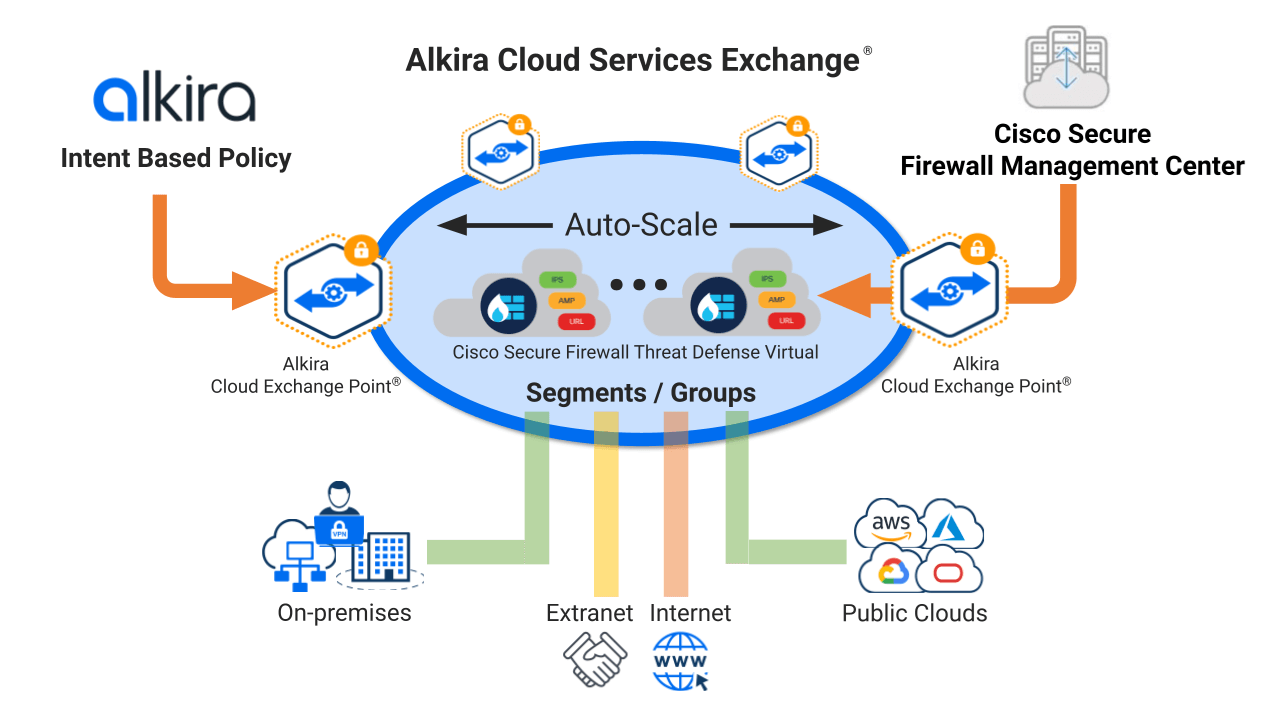
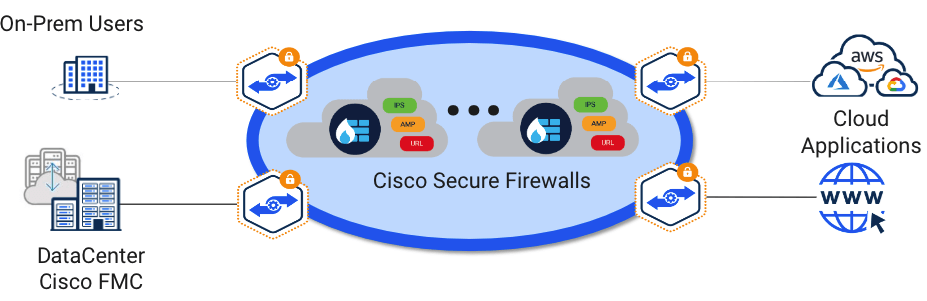
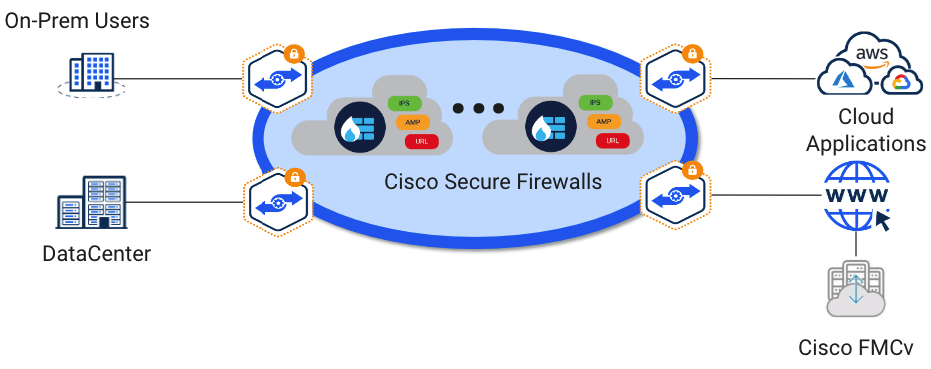
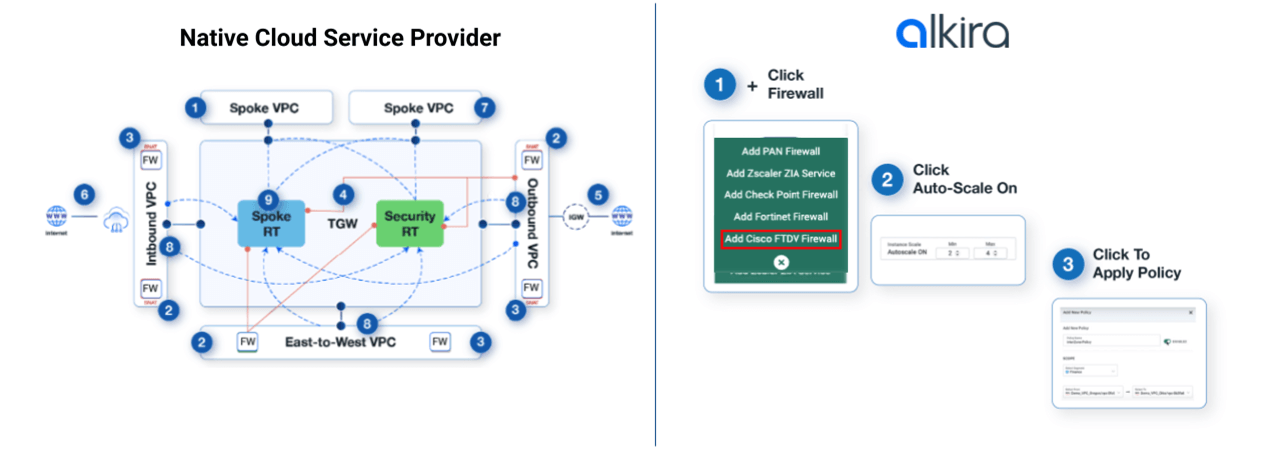
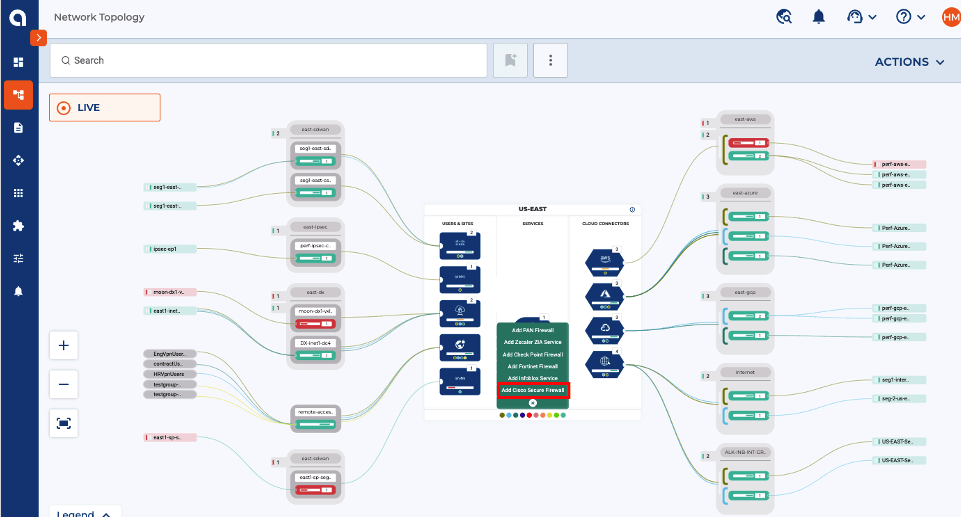
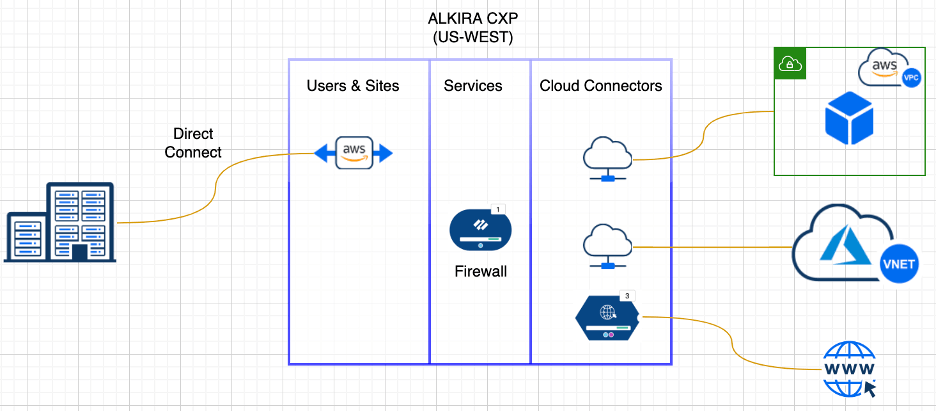
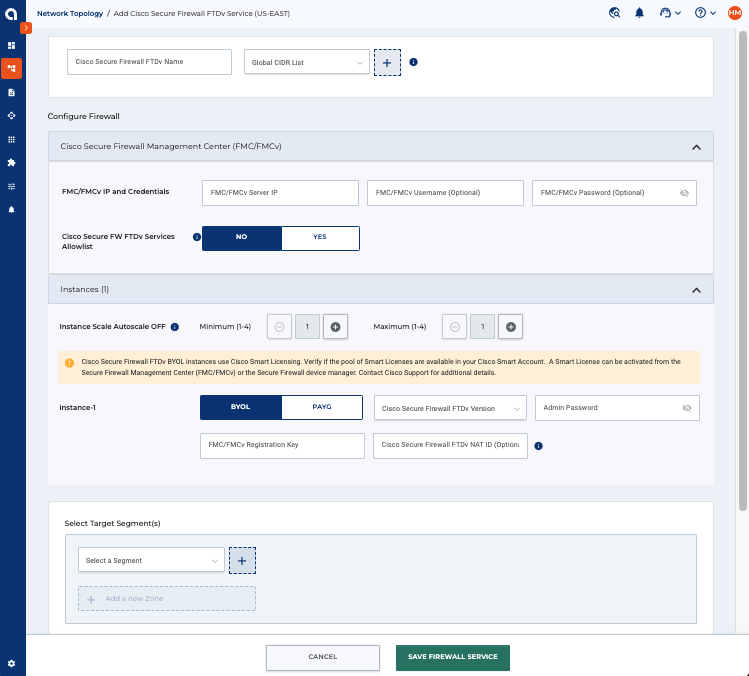
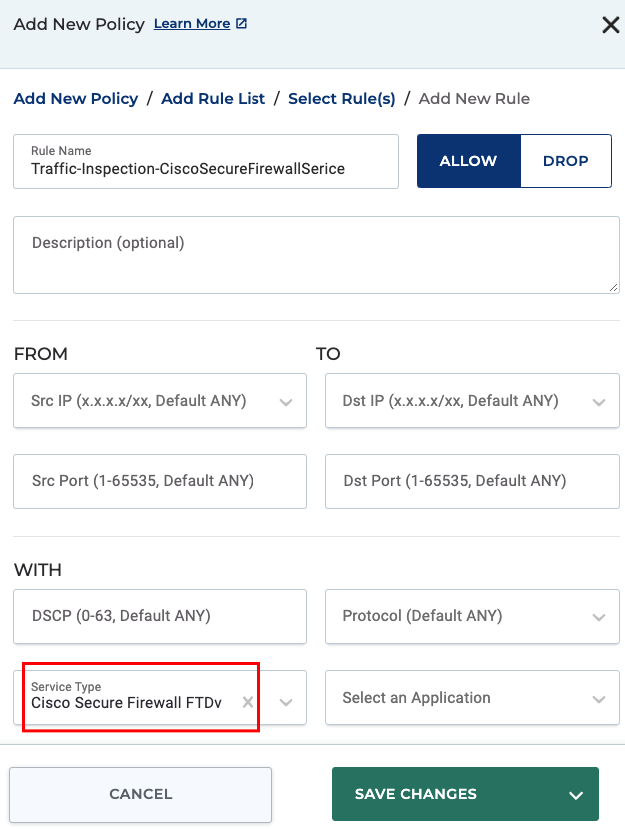 Figure 8: Defining traffic selection policy in Alkira for Cisco Secure Firewall Threat Defense Service